Automatically Delete Your Tweets
100% Local & Private
Runs locally in your browser.
No servers. No stored tokens. No API keys.
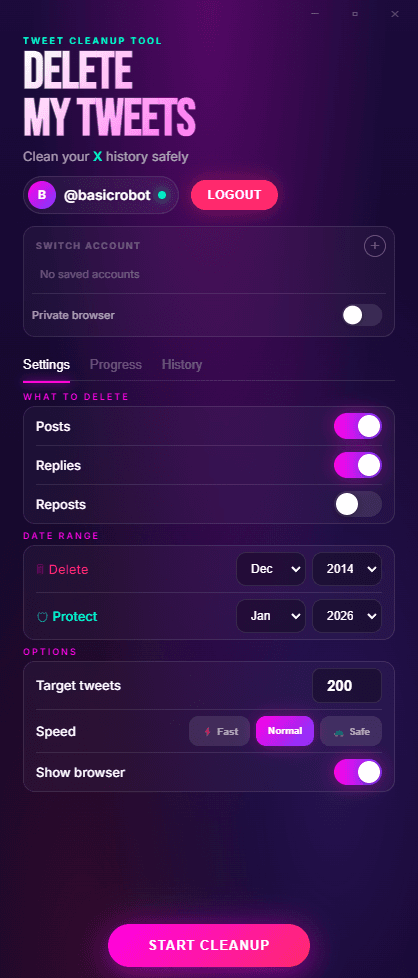
Choose filters and targets
One-time purchase • Runs locally • No subscription
Nothing leaves your computer - not your tweets, not your login, nothing.
I built this because I didn't want to give my account to a cloud service either.
Read why - Built by Kepners, an independent UK developer who wanted a safer way to delete tweets.
Most Tweet Deletion Tools Are Cloud Services
Many tools ask you to grant account access and process deletions on their servers.
OAuth tokens are stored remotely
Cloud tools require account permissions that persist on their servers until you manually revoke access.
What OAuth access allows →Deletion activity may be logged
Many services retain logs of what was deleted, when, and by whom — data you may not want stored externally.
Read the safety review →Your account remains connected until revoked
Once you grant access, cloud tools keep permissions active. Your account stays linked to third-party infrastructure.
Is automation allowed? →Free tiers are restricted by server-side limits
Cloud services cap free deletions because of their own infrastructure costs — not because of X rate limits.
Why free tools fall short →If you're comparing tools because you're concerned about privacy or safety — that's valid.
How Delete My Tweets Works
Simple flow: run locally, sign in with your own account, delete tweets.
STEP 01
Open Delete My Tweets
Launch the app on your computer and choose what you want to clean up.
STEP 02
Sign in with your own account
You log in directly in your own X browser session. No API keys, no OAuth tokens, no third-party account access.
STEP 03
Delete tweets
Start deletion and let the app automate the same actions you would do manually.
STEP 04
No API required
Everything runs on your device with your own session. No cloud relay and no API dependency.
Execution Path
No API required. No intermediate cloud server.
Delete My Tweets Works Differently
Delete My Tweets runs locally on your own computer.
Delete My Tweets → Sign in with your own account → Delete tweets
No API required. No middle layer.
That's it.
Privacy by Design
Delete My Tweets:
✓Does not collect analytics about your tweets
✓Does not store OAuth tokens
✓Does not retain deletion logs
✓Does not require ongoing account access
Once you close the app, there is no persistent connection. If privacy is your priority, the architecture matters.
Who Is This For?
✓Professionals cleaning public history
✓Journalists and public figures
✓Developers who prefer local control
✓Agencies managing sensitive accounts
✓Anyone uncomfortable granting third-party cloud access
If you don't want your Twitter/X account processed by a SaaS platform, this is for you.
Frequently Asked Questions
High-intent answers on safety, GDPR, cloud risk, and local deletion.
Is DeleteMyTweets a cloud service?
No. It runs locally on your computer and does not process data on external servers.
Does it store my Twitter login?
No. No login credentials or OAuth tokens are stored.
Is it safer than cloud deletion tools?
Cloud tools operate on remote infrastructure and store account access tokens. DeleteMyTweets eliminates that layer by running locally.
Do I need API access to use it?
No. Delete My Tweets does not require API keys or developer access. It runs in your logged-in browser session on your own computer.
Is there a tweet delete app that works locally?
Yes. DeleteMyTweets is a desktop app for Windows and macOS that runs locally on your computer, with no cloud processing layer and no subscription requirement.
How does DeleteMyTweets work technically?
You authenticate directly with X in your browser, choose what to delete, and run the process locally. Tweets are removed using your authenticated session. No tweet history is uploaded to third-party servers.
Can I delete tweets from specific years or date ranges?
Yes. DeleteMyTweets supports date filters so you can target a specific year, a specific range, or your full history.
Can I delete retweets and likes too?
Yes. You can remove tweets, retweets, quote tweets, and likes with one local workflow.
How long does it take to delete thousands of tweets?
It depends on account size and X rate behavior. Hundreds can take minutes; larger histories can take hours. The app is built for long, unattended runs.
Is DeleteMyTweets a subscription?
No. DeleteMyTweets is a one-time purchase with no recurring subscription required.
Powerful Features
Simple Interface
Everything you need to clean up your Twitter history, nothing you don't.
Hands-Free Automation
Start the deletion and walk away. The app runs automatically in the background while you do other things.
No Servers. Period.
We have no backend, no database, no servers at all. Your tweets never leave your computer because there is nowhere to send them.
Smart Filtering
Filter by date range, keywords, likes count, or retweets. Delete only what you want to remove.
Uses Your Browser Session
Runs in your browser with your existing Twitter login. No API keys, no third-party access, just your session.
Delete Everything
Tweets, retweets, quote tweets, and likes. Clean your entire history or specific content types.
One-Time Purchase
Pay once, use forever. No subscriptions, no recurring fees. It's yours.
Simple Pricing
One price. One purchase. Yours forever. No subscriptions, no hidden fees.
Lifetime License
Less than a month of Twitter Blue
30-day money-back guarantee. No questions asked.
Before you buy
Deletion takes time. Hundreds of tweets: under an hour. Thousands: several hours. 10,000+: all day or overnight. The app runs hands-free in the background — start it and walk away. Keep your browser open and computer awake for long runs.
What People Are Saying
Real feedback from people who cleaned up their Twitter history
“finally got rid of 8 years of cringe tweets lmao. took like 4 hours but whatever it worked”
Jake
“HR at my new job definitely stalks linkedin AND twitter so this was necesary. Ran it overnight, woke up to a clean timeline 👍”
London
“tried semiphemeral and tweetdelete before this. both stopped working. this one actually finished the job”
Sofia
“look i just didnt want my 2016 political takes showing up anymore ok. no regrets”
anon
“11k tweets down to 2k. took most of saturday but i wasnt doing anythign anyway lol”
Marcus T.
“paranoid about giving apps my password so the fact this runs locally was the selling point for me”
Amy
“only wanted to nuke stuff from before 2020. worked exactly as advertised tbh”
“its not magic its literally just clicking delete for you. but thats exacty what i needed so 🤷♂️”
anon
“left it running while at work. came back to 6000 less embarassing tweets”
Chris
Manchester
“job hunting + old twitter = bad combo. this fixed it”
Dan S.
“finally got rid of 8 years of cringe tweets lmao. took like 4 hours but whatever it worked”
Jake
“HR at my new job definitely stalks linkedin AND twitter so this was necesary. Ran it overnight, woke up to a clean timeline 👍”
London
“tried semiphemeral and tweetdelete before this. both stopped working. this one actually finished the job”
Sofia
“look i just didnt want my 2016 political takes showing up anymore ok. no regrets”
anon
“11k tweets down to 2k. took most of saturday but i wasnt doing anythign anyway lol”
Marcus T.
“paranoid about giving apps my password so the fact this runs locally was the selling point for me”
Amy
“only wanted to nuke stuff from before 2020. worked exactly as advertised tbh”
“its not magic its literally just clicking delete for you. but thats exacty what i needed so 🤷♂️”
anon
“left it running while at work. came back to 6000 less embarassing tweets”
Chris
Manchester
“job hunting + old twitter = bad combo. this fixed it”
Dan S.
“simple. does what it says. no upsells or subscription bs”
“other tools want your api keys or oauth which is sketchy af. this just uses your browser”
Ryan
“15 years of retweets and replies. would of taken me weeks manualy”
anon
“software eng here - appreciated that nothing leaves my machine. most 'delete tweet' services are basicaly spyware”
Berlin
“took way longer than i thought but tbf thats twitters fault not the app. rate limits or watever”
Ben
“the date filter is clutch. kept my recent stuff, nuked everythign from college”
Alex J.
“one time payment > monthly subscription. simple economics innit”
Tom
“does one thing well. refreshing tbh”
anon
“was lowkey scared to use any tool for this but logging in myself made it feel safer idk”
Lauren
“uni tweets from 2014 did NOT need to exist anymore. problem solved 💀”
anon
“simple. does what it says. no upsells or subscription bs”
“other tools want your api keys or oauth which is sketchy af. this just uses your browser”
Ryan
“15 years of retweets and replies. would of taken me weeks manualy”
anon
“software eng here - appreciated that nothing leaves my machine. most 'delete tweet' services are basicaly spyware”
Berlin
“took way longer than i thought but tbf thats twitters fault not the app. rate limits or watever”
Ben
“the date filter is clutch. kept my recent stuff, nuked everythign from college”
Alex J.
“one time payment > monthly subscription. simple economics innit”
Tom
“does one thing well. refreshing tbh”
anon
“was lowkey scared to use any tool for this but logging in myself made it feel safer idk”
Lauren
“uni tweets from 2014 did NOT need to exist anymore. problem solved 💀”
anon
From the Blog
Cloud-vs-local guides, safety breakdowns, and privacy-first deletion strategy.


Delete Your Tweets — Privately. Locally. Permanently.
No servers. No subscriptions. No stored account access.